The Glow-Up Tax: Calculating the Real Cost of RGB in Your Gaming Setup
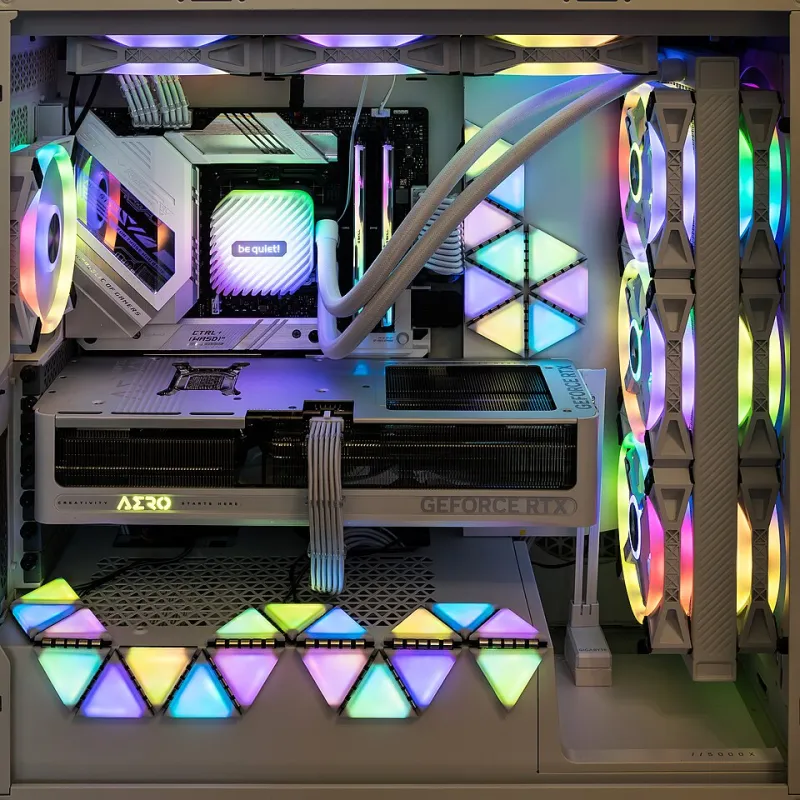
Photo: Jacek Halicki, CC BY-SA 4.0, via Wikimedia Commons
Let's get one thing out of the way immediately: RGB lighting makes your PC look cool. We're not here to be the fun police. A well-lit build with synchronized lighting effects is genuinely satisfying in a way that's hard to explain to non-PC people without sounding slightly unhinged.
But here at BananaPC, we believe in peeling back the price — and when you peel back the marketing veneer on RGB gaming peripherals and components, what you find underneath is a fascinating and occasionally infuriating pricing structure that deserves some honest scrutiny.
So here's the real question: when you buy RGB-equipped hardware, how much of that price tag is buying you actual performance, and how much is buying you a mood lamp that happens to also run Cyberpunk 2077?
The RGB Premium Is Real, and It's Surprisingly Consistent
Across virtually every category of PC hardware, RGB versions of products command a price premium over their non-RGB or "stealth" counterparts. The gap varies by category, but after comparing dozens of products side-by-side, a few patterns emerge:
RAM: This is where the RGB tax hits hardest. A 32GB DDR5-6000 kit from G.Skill in plain black heat spreaders might run you around $90–$100. The identical kit wearing the Trident Z5 RGB crown? Add $20–$35. You're paying up to 30% more for LEDs embedded in a component that lives inside your case, potentially hidden behind a GPU. The performance specs are identical. The silicon is identical. The glow is not.
Cooling: A solid 240mm AIO liquid cooler from a reputable brand without lighting typically runs $80–$110. Add an addressable RGB pump head and illuminated fans, and that same thermal performance in a prettier package costs $130–$170. The cooling performance difference? Negligible. The difference in how it looks through a tempered glass side panel? Undeniably dramatic.
Keyboards and Mice: The peripheral market is where RGB gets philosophically weird. A mechanical keyboard with Cherry MX switches and zero lighting might cost $60–$80. The same switch configuration with per-key RGB backlight adds $30–$60 to the price at most major brands. A gaming mouse with RGB can cost 40–60% more than a functionally identical sensor in a matte black shell.
Cases: Tempered glass panels and built-in RGB fans can add $30–$60 to a case price compared to a solid-panel equivalent with the same internal dimensions and airflow design.
The Dirty Secret: Some RGB Is Worth It, Some Is a Scam
Here's where we stop painting with a broad brush, because the RGB conversation has some genuine nuance buried under all the neon.
When RGB actually justifies the cost:
Keyboards, specifically. Backlit keyboards — RGB or otherwise — have a legitimate functional argument. If you game or work in low-light conditions, backlighting is genuinely useful. Per-key RGB that lets you color-code keys for different games, highlight WASD, or just see what you're typing at 2 AM is a real quality-of-life feature, not pure theater. Spending an extra $30–$40 for that on a keyboard you'll use daily for five years? That math actually works.
Cases with included RGB fans. Buying a case that ships with three decent RGB fans pre-installed often saves money compared to buying a plain case and purchasing RGB fans separately. If you wanted the fans anyway, the "RGB tax" on the case essentially disappears.
When RGB is genuinely just a lighting bill you didn't need:
RAM. Hidden inside your case, rarely visible, zero functional benefit. This is the platonic ideal of the RGB tax. Unless you specifically have a windowed case and a build aesthetic you're maintaining, this is money you're lighting on fire — which is at least thematically appropriate.
GPU RGB. Most graphics cards with RGB lighting charge a $20–$50 premium for LEDs on the shroud. The GPU's performance is entirely determined by its silicon, VRAM, and power delivery — not whether the logo glows. Some AIB partners use RGB models as a soft upsell toward higher-end cooling configurations, which can be worth it, but the RGB itself contributes zero frames per second.
RGB SSD covers. This exists. People buy it. We're not going to comment further.
The Ecosystem Lock-In Problem Nobody Talks About
Here's the part of the RGB conversation that goes underreported: when you buy into a manufacturer's RGB ecosystem, you often commit to their software — and PC lighting software has historically been some of the most bloated, crash-prone, RAM-hungry applications ever conceived by human beings.
Corsair iCUE, Razer Synapse, ASUS Aura Sync, MSI Mystic Light — these are programs that run at startup, consume background resources, occasionally conflict with each other, and have a well-documented history of making PCs behave strangely. If you mix brands (and most builders do), you're running multiple lighting ecosystems simultaneously, each demanding a slice of your system resources and your patience.
OpenRGB, a free open-source alternative, has made this significantly more manageable in recent years — but it requires setup, doesn't support every device, and still represents time you're spending managing light bulbs instead of actually gaming.
So Should You Buy RGB or Skip It?
The honest BananaPC take: buy RGB where it makes you happy, skip it where it makes no visual difference, and never pay the premium on components you can't actually see.
If you're building a showcase rig with a tempered glass case and you want the whole thing to look like a spaceship, own that decision. Just do it consciously, knowing exactly what you're paying for. A fully RGB-optimized build can easily cost $150–$250 more than a functionally identical non-RGB build — and that delta could buy you a better CPU cooler, a faster SSD, or a significantly nicer monitor.
But if you're building inside a solid-panel case, working with a tight budget, or simply don't care about aesthetics — skip every single RGB option without guilt. The frames are identical. The temperatures are identical. The only thing missing is the light show, and the darkness of a closed case hides a multitude of aesthetic sins.
Peel back the price. Figure out what you're actually buying. And remember: no amount of RGB has ever won a match in ranked play.