The Component Nobody Respects Is the One That's Killing Your Build
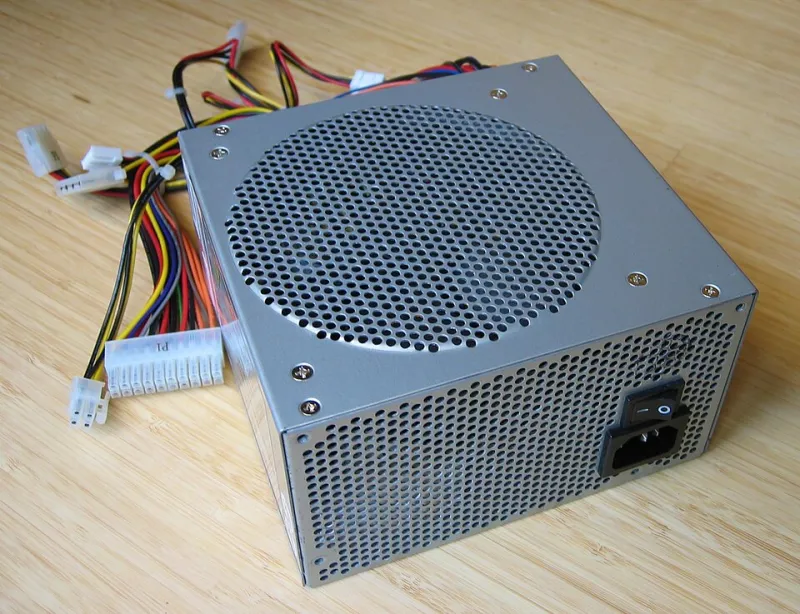
Photo: Hans Haase, CC BY-SA 3.0, via Wikimedia Commons
Every year, thousands of PC builders meticulously research their CPUs, obsess over RAM speeds, and spend entire lunch breaks debating GPU thermal performance. Then they scroll to the bottom of their parts list, see "Power Supply Unit," and pick whatever's cheapest with enough stars to feel okay about it.
This is, to put it gently, a catastrophic way to make decisions.
The power supply is the component that literally feeds electricity to everything else in your system. It is the circulatory system of your PC. And yet it gets treated like the house brand cereal of computer hardware — functional enough, probably fine, whatever. Spoiler: it is frequently not fine. And when it isn't fine, it takes other things down with it.
Why PSUs Get Ignored (And Why That's Completely Backwards)
The power supply doesn't have RGB. It doesn't show up in benchmark scores. You can't post a photo of it and get compliments on your build. It sits in the corner of your case, humming quietly, doing unglamorous work while your GPU gets all the attention and your CPU gets all the discourse.
There's also a perception problem: a cheap PSU and an expensive one both make your system turn on. For weeks, maybe months, you won't notice any difference. This creates a false sense of validation. "See? Works fine. Saved $60."
Then something goes wrong.
PSU failures aren't always dramatic. Sometimes it's a slow degradation — voltage fluctuations that cause random crashes, instability under load, mysterious blue screens that get blamed on drivers or RAM. You'll spend hours troubleshooting the wrong components while your power supply slowly becomes a liability. Other times, the failure is very dramatic: a capacitor lets go, voltage spikes, and suddenly your GPU, motherboard, or storage drive gets a jolt it was never designed to handle.
The math on this is brutal. You saved $60 on a budget PSU. Your GPU then gets fried in a failure event. You're now replacing a $400-$600 graphics card. That's not a cautionary tale — that's a recurring event that happens to real builders every single month.
The Wattage Myth That's Costing You Money
Here's where it gets interesting: most builders think about PSUs almost entirely in terms of wattage, as if a 750W unit is a 750W unit regardless of who made it. It is not.
Cheap power supplies often can't reliably deliver their rated wattage — especially under sustained load or in warm environments. A budget 750W PSU might be perfectly stable at 400W and start doing weird things at 680W. Meanwhile, a quality 650W unit from a reputable manufacturer will deliver clean, stable power right up to its rated capacity without breaking a sweat.
The efficiency rating (those Gold, Platinum, Titanium certifications from the 80 PLUS program) matters here too. An 80 PLUS Gold PSU is converting power efficiently enough that it runs cooler and puts less stress on its components. An unrated or Bronze unit running hot is degrading faster and creating more electrical noise on your rails. That noise? Your other components feel it.
Wattage headroom is real and important — you generally want 20-30% overhead above your system's peak draw — but chasing raw wattage numbers from a no-name brand is like buying the biggest gas tank available for a car with a leaky fuel line.
A Real-World Tier Guide That Actually Makes Sense
Let's cut through the noise. Here's how to think about PSU selection based on your actual build:
Budget Builds (under $600 total) You don't need a $150 PSU, but you absolutely cannot go to the bottom of the barrel. A 550-650W unit from a known brand — EVGA (RIP, but their units are still solid used), Corsair, Seasonic, Super Flower, or be quiet! — in the Bronze or Gold tier is the floor. Expect to spend $60-$90. This is not a place to find an extra $25.
Mid-Range Builds ($600-$1,200 total) You're probably running a modern mid-range GPU that pulls 150-200W under load. A 650-750W Gold-rated unit from a reputable brand is the sweet spot. Budget $80-$120. If you're considering a high-end GPU upgrade in the future, bump to 850W now and thank yourself later.
High-End Builds ($1,200+ total) You've got a flagship or near-flagship GPU, a high-core-count CPU, and potentially multiple storage drives. The RTX 4080, 4090, and RX 7900 XTX are power-hungry in ways that demand quality delivery, not just quantity. An 850W-1000W Platinum or Titanium-rated unit from Seasonic, Corsair's HX series, or be quiet!'s Dark Power line is the call. Budget $130-$200. At this build tier, this is not a meaningful percentage of your total spend.
Workstation/Creator Builds If you're running sustained loads for rendering, streaming, or any professional workload, thermal stability and longevity matter more than almost anything else. Go Platinum or Titanium, buy from Seasonic or be quiet!, and get a warranty of at least seven years. These units are built to run hard for a long time.
The Modular Argument (It's Not Just About Aesthetics)
Fully modular power supplies — where you only plug in the cables you actually need — get marketed as a cable management feature. And yes, they do make your build look cleaner. But there's a functional argument too: fewer cables stuffed into your case means better airflow, which means lower temperatures across the board. In a high-end build, that airflow difference can matter for component longevity.
Semi-modular units are a solid middle ground for most builders. Fully non-modular units are fine for budget builds where you're using most of the cables anyway.
Stop Treating the PSU Like an Afterthought
Here's the BananaPC take, delivered with love: the power supply is the one component where skimping has the highest potential cost relative to the savings. Everywhere else in a PC build, a cheaper option means a performance trade-off. With the PSU, a cheaper option can mean a catastrophic failure trade-off.
The good news is that quality PSUs from reputable manufacturers are genuinely not that expensive. The gap between a risky unit and a solid one is often $30-$50. That's one fewer game at launch. That's a reasonable lunch budget for a week. It is absolutely not worth the alternative.
Peel back the price on your GPU, your RAM, your case — we're always here to help you find the deal. But on the power supply? Pay what it costs to do it right. Your whole rig is counting on it.